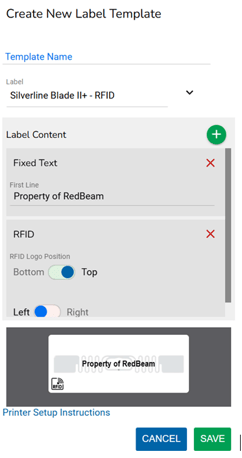
Label templates define the format and content of the labels you print from RedBeam.
1. Create a Templates- click the Add button

- Enter a Template Name that clearly represents the label (My Company Asset Label).
- Choose from one of the supported formats:
- Silverline Blade II+ RFID on metal tag
- Nnon-RFID 2” x 1” tag.
To add content to the label, click the  button in the Label Content section and choose from Fixed Text, Barcode, QR Code or RFID.
Choosing Fixed Text allows the user to enter a line of text that will always appear on the label.
Choosing Barcode or QR Code allows the user to populate the label with a barcode and its corresponding human readable value. RFID adds the universal symbol for RFID on the top of the tag.
Click Save to save the label format.