The Roles tab allows Administrators (and any users granted access to this page) to define or modify system roles. Roles control user permissions across pages, features, and devices.
To create a new role:
- Click the Add button (
 ) to start from scratch, or
 - Select an existing role in the grid and click the Copy button to duplicate it.
Enter the Role Name and a brief Description for reference.
An Overview window will appear, explaining that roles can be customized by enabling or disabling access to:
- Entire menu pages
- Specific features within each page
- Device-based visibility (desktop, tablet, or mobile)
You may also control whether the role automatically gains access to newly released RedBeam features.
- When an individual permission toggle is in a neutral (middle) state, the global Enabled/Disabled setting will determine its default behavior.
- Enabled = defaults to Yes
- Disabled = defaults to No
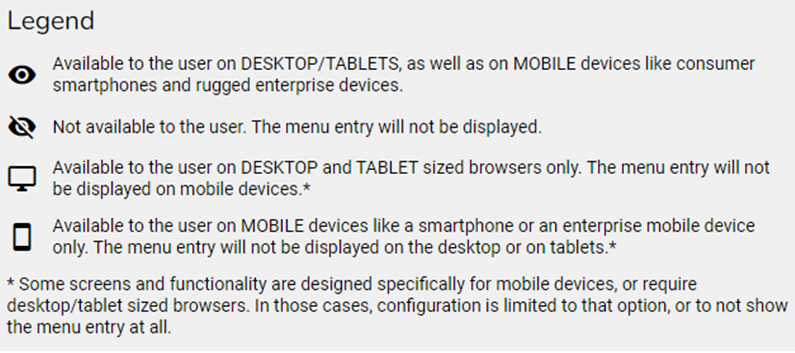
From the Overview, click the icons beside each page name to adjust access:
- Full Visibility (all devices)
- No Visibility
- Desktop/Tablet Only
- Mobile Only