![RedBeam Logo White - HubSpot.png]](https://support.redbeam.com/hs-fs/hubfs/RedBeam%20Logo%20White%20-%20HubSpot.png?height=40&name=RedBeam%20Logo%20White%20-%20HubSpot.png)
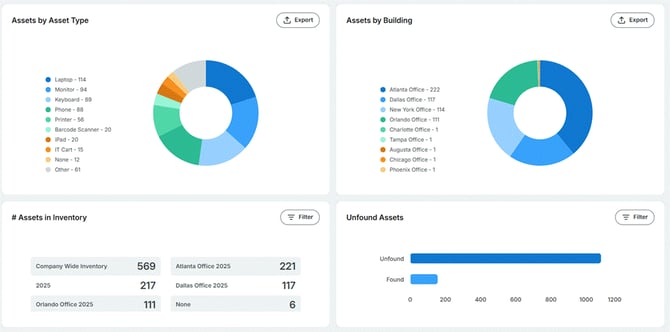
The Dashboard opens upon login and serves as the central visual command center, aggregating high-level metrics and active audit metrics across your account.
|
Dashboard Panel |
Metric Description & Operational Purpose |
|
Assets by Asset Type |
Displays a visual distribution breakdown of total active assets categorized by type. |
|
Assets by Building |
Provides geographical distribution metrics across facilities and sites. Useful for multi-location asset density analysis. |
|
# of Assets in Inventory |
Displays the total number of items included in active inventory audit sessions. Users with multiple active sessions can select individual inventory sessions via a dropdown selector. |
|
Unfound Assets |
Provides audit reconciliation status, separating items into Found and Unfound states for active inventory sessions. Users with multiple active sessions can select individual inventory sessions via a dropdown selector. |