![RedBeam Logo White - HubSpot.png]](https://support.redbeam.com/hs-fs/hubfs/RedBeam%20Logo%20White%20-%20HubSpot.png?height=40&name=RedBeam%20Logo%20White%20-%20HubSpot.png)
The RFID module manages networked fixed RFID readers, antenna configurations, and system-wide read profiles. Fixed readers collect real-time asset movement data and stream updates directly to RedBeam.
1. Managing Fixed RFID Readers: Fixed readers auto-register with RedBeam when connected to an internet-enabled network. Pre-configuration is also supported for hardware deployments requiring setup prior to on-site installation.
- Auto-Registered Metadata: Connected readers automatically populate IP Address, Device Type, MAC Address, and Firmware Version.
- Adding a Reader Manually: Click Add (+), then specify the Hostname, Company, and Building. (Note: Saving unlocks the Edit and Device Settings tabs.)
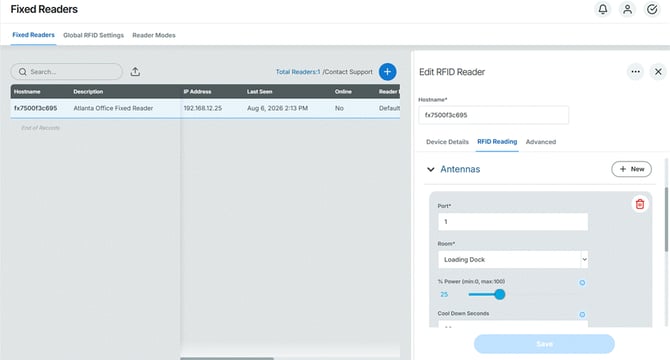
- Editing/Deleting Readers: Select a reader from the grid to modify fields in the right-side detail pane, save changes, or delete the record.
- Heartbeat & Offline Alerts:
- RedBeam tracks reader connectivity using a background heartbeat interval.
- If a reader fails to respond after three consecutive intervals, its status changes to Offline = Yes.
- Toggle Offline Email = Yes in Device Details to automatically notify system administrators upon connectivity loss.
- RFID Reading & Antenna Configuration: The RFID Reading sub-tab configures hardware ports and antenna coverage zones.
- Adding Antennas: Select the target Company and Building, define the reader's port count, and click + to map antennas.
- Core Antenna Parameters:
- Location (Mandatory): Maps the antenna to a specific physical location. When a tag is read, the asset's location in RedBeam automatically updates to this zone.
- % Power: Controls the read range (scale: 1 to 100). If an antenna port requires 0 power, delete the antenna record.
- Cool Down: Sets the delay (in seconds) before the same antenna can log consecutive reads of a single tag.
- Port: Assigns the physical port number on the fixed reader.